Hotel and riad WiFi in Morocco: coverage, captive portal and security
Professional WiFi for hotels and riads in Morocco: room-by-room coverage, thick walls, captive portal, separate networks, roaming and Law 09-08.
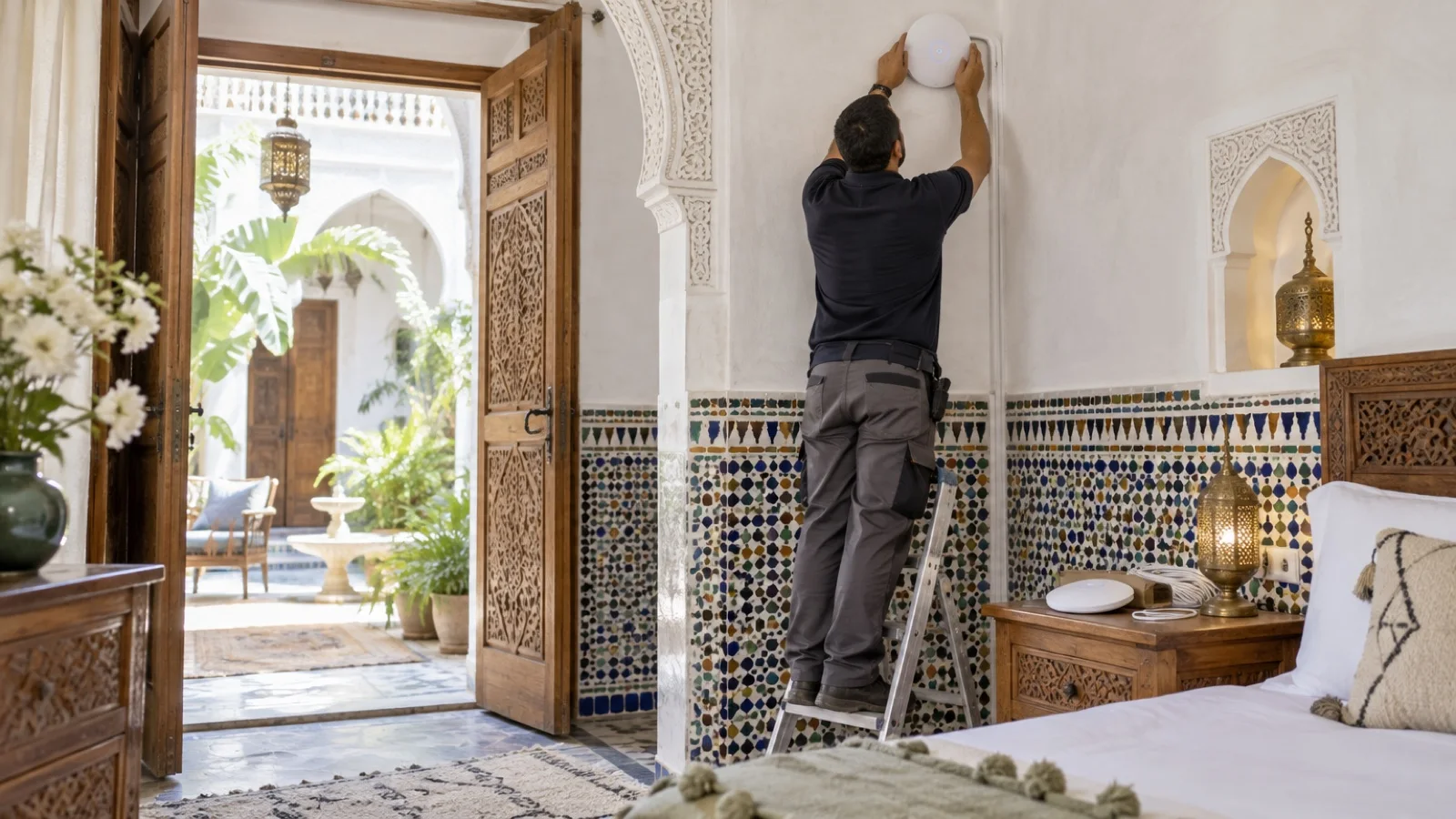
The short answer: in a hotel or riad in Morocco, WiFi is judged room by room, not on the access point’s datasheet. You need one access point per area the walls enclose, a cable to every access point wherever the building allows, a guest network fully separated from the PMS, POS and staff, a simple captive portal and monitoring that detects a failed access point before a guest mentions it in a review.
This guide is for hotel managers, riad operators and guesthouse owners in Marrakech, Fez, Essaouira, Casablanca and elsewhere. It explains why WiFi drops in Moroccan buildings and how to design, secure and run it. Technical capabilities quoted here come from vendor documentation; we give neither prices nor theoretical performance figures, which say nothing about your building.
Why hotel and riad WiFi is hard
In an office, a few ceiling access points cover an open floor. A hotel, and even more a riad, is the opposite: a series of small closed rooms, often separated by thick brick or rammed-earth walls or tadelakt finishes, with solid wooden doors, tiled bathrooms and an open-air central courtyard.
Each of these weakens the signal. The result is familiar: a powerful access point in the courtyard or corridor shows “three bars” on the terrace and nothing in the back bedroom, or a phone shows the WiFi but cannot load a page. The problem is almost never the internet connection speed; it is the wireless design.
Three more constraints are specific to hospitality:
- Guests arrive with several devices each (phone, laptop, tablet, watch) and expect to stream video in the evening, when everyone is online.
- Staff depend on WiFi too: reception tablets, payment terminals, WiFi phones for housekeeping or room service, cameras, connected locks.
- The building is often protected: you do not drill through a painted ceiling or a zellige wall like an office partition.
Coverage first: one access point per area, not one powerful unit
The rule that changes everything: several access points at moderate power, close to the rooms, beat one powerful access point for the whole floor. A loud access point is heard from afar by the phone, which latches onto it, but the phone lacks the power to answer back through two walls.
| Building layout | Recommended approach |
|---|---|
| Modern hotel, central corridor, light partitions | Access points in corridors or every other room, validated by measurement |
| Hotel with thick load-bearing walls | Access points in rooms, or in-room wall-plate access points |
| Riad around a courtyard | One access point per room or group of rooms, outdoor units for courtyard and terrace |
| Terrace, pool, garden | Outdoor-rated access points, PoE powered |
| Restaurant, breakfast room, meeting room | Plan for capacity (concurrent devices), not just coverage |
Frequency bands matter. 2.4 GHz reaches further but has few channels and saturates quickly; 5 GHz offers many more channels and throughput, with shorter range. In a partitioned building, a network designed for 5 GHz with an access point close to each room performs far better. The 6 GHz band on recent access points depends on national regulations and guest devices: we check case by case what equipment sold in Morocco allows.
For the difference between coverage and capacity, and how to measure, see our guide to high-density enterprise WiFi.
Cabling: the invisible part that makes the quality
Each access point needs a network cable that carries both data and power (PoE) from a switch in a rack. This is the trickiest part in a riad or an older hotel: finding discreet routes, reusing existing conduits, going through false ceilings or skirting boards.
When running a cable is genuinely impossible, access points can link to each other by radio (mesh mode). It is a fallback: the wireless link between access points uses airtime that is no longer available to guests, and each extra hop degrades the result. We cable most access points and keep mesh for an isolated room or a pavilion.
In the rack, plan a PoE switch sized for all access points, and a UPS: a power cut should not take down the whole WiFi. Our guides to business network cabling and to the patch rack and PoE switches cover these choices.
Separate the networks: guests, staff, PMS, POS
A hotel runs uses on the same infrastructure that must never cross. Good practice is one logical network (VLAN) per population, each with its own firewall rules.
| Network | Who connects | What it can reach |
|---|---|---|
| Guests | Guests’ phones and laptops | Internet only, client isolation enabled |
| Staff | Reception tablets, workstations, service phones | Business applications, filtered internet |
| PMS and POS | Hotel software, payment terminals | Only the servers and services required |
| Voice | Desk or WiFi IP phones | The phone system, with priority |
| Devices | Cameras, locks, TVs, connected air conditioning | Their management servers, nothing else |
Two settings are essential on the guest network. Client isolation stops a device from seeing or attacking the one in the next room. Per-device bandwidth limits prevent a single guest downloading from degrading everyone else’s connection.
If your service phones run over WiFi, voice must be prioritised and coverage designed for it in corridors, kitchens and back-of-house areas, as explained in our guide to the hotel phone system.
Roaming: moving between access points without dropping
A guest walking from their room to the restaurant changes access point several times. If the handover is poor, the WhatsApp call drops or the video freezes. Three standards help devices switch cleanly:
- 802.11k: the access point gives the device a list of neighbouring access points, so it does not have to search.
- 802.11v: the network can steer a device towards a less loaded or better-placed access point.
- 802.11r (“fast BSS transition”): reconnection to the new access point is faster, which matters for voice.
Professional vendors support these options; on Fortinet, for example, they are set per SSID in the FortiAP configuration. Some older devices handle them poorly: we enable them after testing, network by network.
The captive portal: useful, as long as it stays simple
The captive portal is the page shown before internet access. It is used to accept terms of use, hand out time-limited access or identify the guest. Several approaches exist:
| Approach | How it works | For whom |
|---|---|---|
| Acceptance page only | Guest accepts the terms, no input | Riad, guesthouse, café |
| Code per stay | Reception hands out a login that expires at checkout | Hotel that wants to control access |
| Room-based login | Portal checks name and room number against the PMS | Hotel with a compatible PMS, via a third-party portal |
| Marketing portal | Login by e-mail or social network, contact collection | Venue that uses this data, with consent |
On a FortiGate firewall, the built-in WiFi controller offers an acceptance page, with or without authentication, and a “guest administrator” account limited to creating guest logins, which can carry an expiry date: a good fit for reception. WatchGuard access points managed from WatchGuard Cloud offer a customisable cloud-hosted captive portal, or integration with a third-party portal.
One caution: an overly complex portal gets bypassed or generates calls to reception. For most riads, an acceptance page is enough. Also consider the Wi-Fi Alliance’s Wi-Fi Enhanced Open: on a network without a password, it encrypts each device’s connection, and it works alongside a captive portal. Recent devices support it.
Guest data: what Law 09-08 says
As soon as the portal collects a name, e-mail address or phone number, or you keep connection logs linked to a person, you are processing personal data. Moroccan Law 09-08 applies: clear guest information, a defined purpose, limited retention, an unticked consent box for any marketing use, and CNDP formalities depending on the processing. Our article on Law 09-08 and business obligations details the process.
The simplest approach is often to collect only what you actually need.
Security: the settings that protect the property
Hotel WiFi is a network open to strangers, sitting next to the systems that take payments and store guest data. The baseline:
- WPA3 on staff networks, with a staff-only password changed when an employee leaves, or individual authentication (WPA3-Enterprise) for larger properties.
- No access from the guest network to access point, firewall or PMS administration.
- Filtering of malicious sites on both guest and staff networks.
- Regular firmware updates for access points and firewall.
- Named admin accounts protected by two-factor authentication, never the default password.
- Rogue access point detection where the solution supports it: a fake access point mimicking your WiFi name is a classic trap in public venues.
The firewall choice matters as much as the access points: with a FortiGate, FortiAP access points and FortiSwitch switches are managed from the same console, as explained in FortiSwitch and FortiAP: running the whole network from the FortiGate. We are a Fortinet partner and a WatchGuard partner.
Which solution for which property
| Property | Our usual approach |
|---|---|
| Riad or guesthouse with a few rooms | Cloud-managed or firewall-managed access points, acceptance page, separate staff network |
| Hotel already running a FortiGate | FortiAP managed by the FortiGate, built-in guest portal, FortiSwitch as an option |
| Hotel running a WatchGuard Firebox | WatchGuard access points managed from WatchGuard Cloud |
| Hotel with meetings and a restaurant | High-density access points in function rooms, per-device bandwidth limits |
| Multi-site group | Centralised management in the vendor’s cloud, same settings everywhere |
To compare two common approaches, read Ubiquiti UniFi or Fortinet FortiAP. And do not forget the internet link: a well-covered hotel is still down without a backup when the line fails, see our guide to business fibre in Morocco.
Mistakes we fix most often
- ISP routers or consumer repeaters added complaint after complaint, each with its own network name.
- One powerful access point in the courtyard meant to cover the whole riad.
- Guests and POS on the same network, without isolation.
- A single WiFi password displayed at reception, shared by guests and staff for years.
- Cascaded mesh over several hops, with no cabling at all.
- No monitoring: the failed access point is discovered through a bad review.
- A captive portal collecting e-mails without information or consent.
Checklist before starting the project
- Floor and room plans, wall materials, outdoor areas to cover.
- Uses: number of rooms, meeting room, restaurant, staff WiFi phones.
- Possible cable routes, rack location, backed-up power.
- Networks to create: guests, staff, PMS and POS, voice, devices.
- Captive portal type and data collected, in light of Law 09-08.
- Existing firewall and access point management solution.
- Main internet link and backup.
- Who monitors and who responds to failures, including in high season.
How we do it
We start with an on-site visit and coverage survey, room by room, taking into account walls, courtyards and building constraints. We then provide the placement plan, hardware and licences, with or without installation, and carry out cabling, mounting and configuration: separate networks, captive portal, roaming, security. Acceptance is done by measurement in every room, with a summary report.
In operation, access points, firewall and internet link are monitored 24/7, and a critical incident is handled in under 15 minutes, from Casablanca, remotely or on site. See our professional WiFi in Morocco offering and our page on IT for hotels, riads and restaurants, then request your free initial audit: we reply within 24 business hours.
Frequently asked questions
How many WiFi access points does a riad need?
There is no reliable ratio: it depends on the walls, floors and courtyard. In a riad, thick walls block much of the signal, so one access point per room or per group of nearby rooms is often needed. Only an on-site coverage survey can set the number and placement.
Do we need a captive portal for guest WiFi?
It is not mandatory, but it helps to display terms of use, limit connection time or hand out a code per stay. If the portal collects a name, e-mail address or phone number, that is personal data processing under Moroccan Law 09-08: guest information, consent for marketing and the relevant CNDP formalities.
Can guest WiFi share the network used by the PMS and POS?
No. Guest WiFi must sit in its own network (VLAN), with no access to the PMS, POS, cameras or staff devices, and with client isolation enabled so one device cannot reach another.
Can we avoid cabling every access point in an old building?
Yes, with access points linked wirelessly (mesh mode), but the radio link between access points uses part of the capacity. We keep it for places where running a cable is impossible, and cable most access points.
Which WiFi solution for a hotel: Fortinet, WatchGuard or another?
If the hotel already has a FortiGate firewall, FortiAP access points are managed from it, guest portal included. WatchGuard access points are managed from WatchGuard Cloud, with a cloud-hosted or third-party captive portal. For a riad without a branded firewall, a cloud-managed solution may be enough. The choice depends mostly on what is in place and who will run it.
About the editorial team
ALLSAFE SOLUTIONS
Network, security and cloud engineers
Written by the engineering team at ALLSAFE SOLUTIONS, a managed IT provider founded in Casablanca by network, security and cloud engineers. Our articles draw on the projects we deliver for clients in Morocco and abroad.
LinkedIn